One easy way to have a rclone in the current folder (adapt with your distribution):
curl https://downloads.rclone.org/rclone-current-windows-amd64.zip -o rclone.zip && 7z e -y rclone.zip && del rclone.zip
One easy way to have a rclone in the current folder (adapt with your distribution):
curl https://downloads.rclone.org/rclone-current-windows-amd64.zip -o rclone.zip && 7z e -y rclone.zip && del rclone.zip
Here is an easy way to secure a proxmox interface with proper https.
Recently, I accidentally put the wrong firmware on a Somu, thereby bricking it.
In order to unbrick it, it is necessary to link it with a STLink.
See the following schema to have the correct pinout (taken from here).
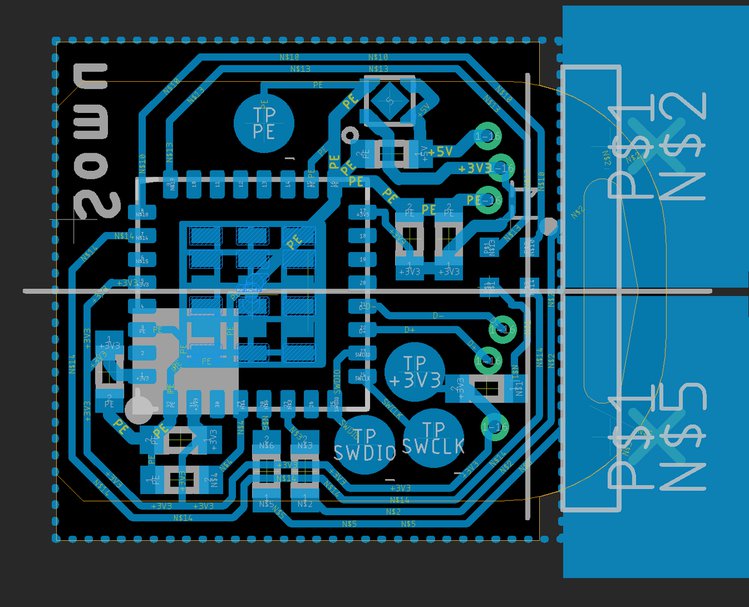
Don’t forget it may be mirrored from what you are seeing. Use the the clues and asymmetries in order to figure out which pin is which.
The following correspondance must be made:
Instead of using the CA.pl script, it’s easier to create the certificates by hand.
Create CA then server key:
sudo -s
openssl req -new -keyout server.key -out server.csr -subj "/C=FR/ST=Paris/CN=vpn.example.org"
openssl x509 -days 1095 -req -in server.csr -CA ca.crt -CAkey ca.key -CAcreateserial -out server.crt
mv server.crt /config/auth/server.crt
mv server.key /config/auth/server.key
Half automated steps in order to have a proper debian installed with AWS, Azure, Scaleway, etc.
Create a host.yml file with contents: